The Brickhouse TrackPort Pro is the tracker buyers choose when they want vehicle diagnostics alongside location: it plugs into the OBD-II port and reports not only where the car is but how it is running. This review evaluates the TrackPort Pro against Brickhouse’s official product page and support documentation, its published plan structure and the fit for owners and small fleets who want one device for tracking and health data. We do not claim independent road-test measurements; the evaluation is based on documented specifications, platform features and owner-reported patterns treated as anecdotal.
What is the Brickhouse TrackPort Pro, and who is it for?
The TrackPort Pro is an OBD-II diagnostic GPS tracker that combines live location with vehicle-health data, aimed at owners and small fleets who want both from one plug-in device.
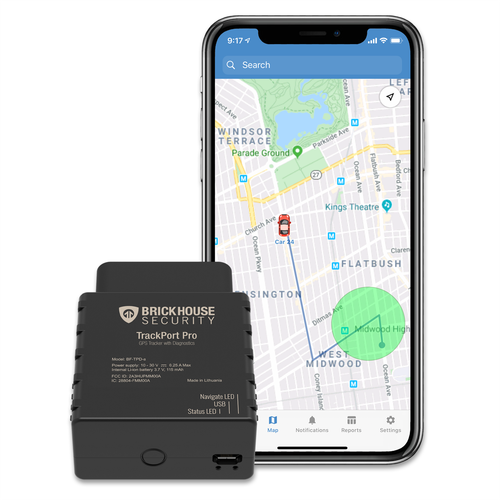
Brickhouse’s official product page describes the TrackPort Pro as a diagnostic vehicle tracker that plugs into the OBD-II port and provides location history alongside diagnostics such as VIN, odometer, fuel economy, battery health and diagnostic error codes. That combination is the product’s reason to exist: a family or small fleet can replace a separate GPS tracker and code reader with one subscription. It is positioned above simple locators such as Bouncie, and below full fleet telematics platforms.
The TrackPort Pro is not a covert or battery-powered device — it is a visible OBD plug-in that needs the car’s port power — so buyers with theft-concealment needs should compare magnetic options such as the LandAirSea 54 and the hardwired category.
What do we know about setup, and how long does it take?
Setup is a plug-in plus account activation: insert the device into the OBD-II port, then activate the Brickhouse plan and register the device on the tracking platform.
Because the TrackPort Pro is an OBD device, installation requires no wiring and takes minutes on most cars and light trucks with the standard port. Brickhouse’s support pages document the manual, FAQs and platform setup, which covers activation and troubleshooting. As with every OBD tracker, vehicle behavior varies — some ports stay powered when parked and others do not — so owners should confirm how the device reports on their own car before relying on it. Our OBD explainer covers this port behavior in depth.
How much does the TrackPort Pro cost with its subscription?
The TrackPort Pro is sold with Brickhouse’s tracking plans, and the price depends on the plan tier and billing term shown on the official page.
Brickhouse publishes plan options on the TrackPort Pro product page, with tiers that differ by update frequency and history depth; its support documentation and storefront are the sources to check for current pricing and promotions. The year-one total includes the device and the plan, and the diagnostic data is part of the subscription rather than a one-time feature. Buyers comparing the TrackPort Pro with Bouncie or Vyncs should weigh the added diagnostics against the higher typical plan cost.
How does the TrackPort Pro install, and where does it not fit?
The TrackPort Pro plugs into the OBD-II port, which is easy and reversible but leaves the device visible, removable and dependent on the car’s port power.
The OBD-II port has been standard on US cars and light trucks since 1996, so the device fits most vehicles mechanically. The limits match every OBD tracker: the plug can be seen and removed, the device stops reporting if the port is powered down with the ignition, and a thief who removes it ends tracking immediately. Brickhouse’s broader lineup includes hardwired options for buyers who need permanent, tamper-resistant coverage; the TrackPort Pro is the diagnostic-focused plug-in choice rather than the covert one.
What does the Brickhouse platform offer day to day?
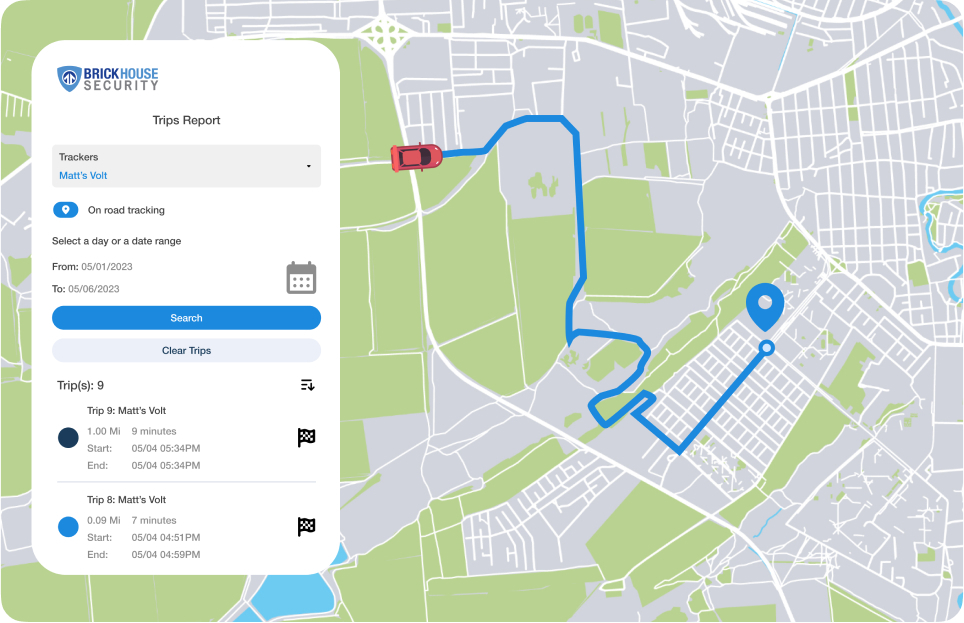
The Brickhouse tracking platform covers live location, history, geofences and alerts, with the TrackPort Pro adding vehicle diagnostics and health reports to the same dashboard.
Brickhouse’s product page lists location tracking history and diagnostic monitoring, including odometer, fuel economy, battery health and error codes, through its tracking platform and mobile apps. That dashboard is the main difference from simpler consumer trackers: instead of opening one app for location and another for codes, the owner sees both in one place. Plan tier determines history depth and update frequency, so buyers should confirm the tier’s limits before choosing the cheapest option.
What do we know about accuracy and update speed?
The TrackPort Pro reports GPS location over the Brickhouse platform, with update frequency and history depth set by the plan tier you choose.
Brickhouse’s product comparison materials show multiple tiers with different update intervals and history lengths, so “real-time” depends on the plan — a faster tier reports more frequently and retains more history. GPS accuracy follows normal consumer behavior: open-air fixes are solid, while garages and metal structures weaken them. For diagnostic data, the device reads the same OBD channel a mechanic uses, so code and health reports are only as current as the vehicle’s last drive and the plan’s reporting cadence.
Does the TrackPort Pro drain the car battery?
Like every OBD device, the TrackPort Pro draws a small current while the port is powered, which is usually harmless for daily drivers but can matter during long idle periods.
The drain question follows the car: vehicles with always-on OBD ports add the device’s draw to normal parasitic load, while vehicles that switch the port off with the ignition avoid it but stop reporting while parked. Daily drivers recharge through the alternator and rarely notice the device. Owners who park for weeks, or who already have weak batteries, should monitor voltage or choose a battery-powered tracker — the same guidance applies to Bouncie and Vyncs in our OBD explainer.
What do owners complain about most?
Owner themes center on the subscription cost relative to simpler trackers, plan tier limits, and occasional app or support issues common to tracking platforms.
Because the TrackPort Pro carries a higher typical price than basic locators, the most common owner complaint is cost: buyers who only wanted location feel they overpaid for diagnostics they rarely use. Plan-tier complaints appear when owners discover history or update limits on cheaper plans, and app or support reports vary by period. We treat these as anecdotal patterns to verify — read the plan terms and test the platform before committing to an annual term, consistent with our How We Test methodology.
How does the TrackPort Pro compare with Bouncie and Vyncs?
The TrackPort Pro adds diagnostics and deeper fleet-oriented features at a higher price, while Bouncie and Vyncs offer simpler and cheaper OBD tracking for most families.
| Model | Focus | Typical positioning | Best fit |
|---|---|---|---|
| Brickhouse TrackPort Pro | Location + diagnostics | Premium OBD with health data | Owners who want codes and mileage in one app |
| Bouncie | Location + safety alerts | Simple monthly OBD | Most family buyers |
| Vyncs | Location + vehicle data | Annual no-monthly-fee OBD | Budget buyers paying yearly |
Buyers who want the diagnostic layer and are comfortable with a premium plan should compare the TrackPort Pro’s official tiers with Bouncie’s simpler pricing and Vyncs’ annual plans; the added data only earns its cost if the owner actually reads it.
Who should buy the TrackPort Pro, and who should skip it?
Buy it for combined GPS and vehicle-health monitoring of daily drivers or small fleets; skip it if you only need location or want the lowest monthly cost.
The TrackPort Pro fits owners who maintain several vehicles, want odometer and code data without a separate scanner, and will use the dashboard. It is a weaker fit for budget buyers (Bouncie and Vyncs cover location at lower cost), for owners seeking hidden theft tracking (magnetic or hardwired), and for anyone who will never open the diagnostics view — in that case the premium is wasted. Small fleets that want driver behavior and health data in one platform are the clearest match.
The bottom line for 2026: the Brickhouse TrackPort Pro is the strongest OBD choice in our coverage when diagnostics are part of the job, and an expensive way to track location when they are not. Buy it for the combined dashboard, and compare the plan tier’s update and history limits before checkout.
FAQ: Brickhouse TrackPort Pro review
What does the TrackPort Pro track besides location?
Brickhouse describes diagnostics including VIN, odometer, fuel economy, battery health and diagnostic error codes, delivered through the same platform as location. The data comes from the vehicle’s OBD channel while the device is connected.
Is the TrackPort Pro hardwired or plug-in?
It is an OBD-II plug-in device, so installation takes minutes with no wiring. Brickhouse’s lineup includes hardwired options for buyers who need permanent, tamper-resistant installation.
Does the TrackPort Pro need a subscription?
Yes. Brickhouse sells the device with tracking plans whose tier sets update frequency and history depth; the official product page lists the current plans and pricing.
Will the TrackPort Pro work on my car?
It works with vehicles that have the standard OBD-II port, common on US cars and light trucks since 1996. Actual reporting behavior depends on whether the port stays powered when parked, so test it on your car.
Compare the TrackPort Pro’s diagnostic value against Bouncie and Vyncs in the best car GPS trackers hub, and read the OBD explainer for battery and port-behavior guidance.